Mostrando las entradas con la etiqueta Timelines. Mostrar todas las entradas

domingo, abril 05, 2015

Futuro del 400..(o como se llame en 2020)

Linea de tiempo planificada para el System i - (En IBM System Magazine)

Steve Will, Arquitecto Jefe del System i,  publica en IBM System Magazine (30 de marzo) un artículo explicando la planificación de futuras versiones del System i (AKA AS400, i Series, System i...), que extiende el ciclo de vida de los sistemas hasta dos próximas versiones como planes inmediatos, llevando su ciclo de vida hasta más allá de 2025: la corriente versión aparece planeada hasta 2020/2021, y confirma que están trabajando en dos siguientes versiones (Next i+1/Next i+2). La primera, con cambios que expanden características ya en desarrollo, y la siguiente, determinada por cambios mayores no contenibles en la primera.
(...) we have two major releases under development right now. The 7.2 release came out less than a year ago, and we’ve been working hard on its following major release – called “i next” on this chart. But, we have items that we know cannot fit into “i next” but which require a major release, so we are working on the one after that, “i next +1.” 
 Lo más importante del artículo de Will es la indicación del compromiso de IBM con el sistema, y de su potenciación en el marco de la evolución tecnológica actual:
The key to understanding this next chart is to recognize when there is a known, committed date and when there is just a direction. A known date is represented when the horizontal line has a vertical end. For example, IBM i 6.1 was released in 2008, and its announced end of service is in 2015; both ends of that line are vertical. But while IBM i 7.2 came out in 2014 (vertical left end) the end of service date is indicated by an arrow, meaning we have not announced anything.

However, if 7.1 and 7.2 are each supported as long as 6.1 and V5R4 were, then 7.2 is going to be supported out into the 2020s.

And, very importantly, I told you that we have two more releases actively under development right now. When will they be released? Well, the ends of those lines are arrows, so we’re not saying yet. The availability dates could still change, but clearly, we don’t tend to deliver new releases any sooner than two years these days, and sometimes it’s longer than that. So, “i next” and “i next +1” will come out sometime, and if they also are supported for seven years, well, we’re more than 10 years out into the future now.

Furthermore, on the previous chart, we discussed that new capabilities are coming out in between releases. This means that the “Support” chart does not indicate only “support” but also a timeline for delivery of new function via TRs.
 Frente a la socarrona afirmación (repetida frecuentemente) de la obsolescencia del equipo, creo que realmente tendríamos que pensar más en la obsolescencia de las perspectivas con que se planean desarrollos sobre la plataforma: cada vez me siento más inclinado a abandonar definitivamente cualquier referencia al "400", considerando la distancia entre aquello que estaba disponible en el 400 hace veinte años, y lo que es posible hacer hoy en el "i":
We’re adding new capabilities in virtualization, cloud, I/O, DB2, mobile, open standards and much more. Staying current with new technology is a clear indication we are investing and plan to be around for a long time.

miércoles, agosto 13, 2014

Windows 9, ¿a vueltas y revueltas?

Un post de CA en Google+ pone sobre aviso:
We've already said goodbye to Windows XP and now we're saying goodbye to Windows 8. What's next for Windows devotees?
El post remite a una nota de Alex Wilhelm en TechCrunch del 10 de agosto (Saying goodbye to Windows 8) que básicamente adelanta una relativa vuelta atrás de la marcha hacia mobile en la siguiente versión, Windows 9, Threshold, o como finalmente se llame:
If Windows 8 was a dramatic lurch towards mobile computing, especially on tablets, Windows 9 appears to be heading for a more equitable balance between desktop muscle, and mobile capability. That fits into the larger picture of the computing environment, where PCs are stabilizing after a dramatically difficult period, and tablet growth is cooling.
Microsoft needs to ensure that its desktop-facing operating system manages to support the still-large demand for desktop-focused PCs well. That doesn’t meant that Windows, as part of Microsoft’s vaunted ‘one Windows‘ strategy can abandon tablets, but it does mean that the focus needs to be more even.
¿Es una vuelta atrás completa? Imposible, particularmente si tomamos en cuenta el cambio de arquitectura ya producido (WinRT):
So back to the desktop? Not entirely. Microsoft isn’t backing down from the Windows Store. It isn’t abandoning the Start Screen. Live Tiles do not appear to be going anywhere, on Windows or Windows Phone. Instead the company seems to be at once focusing on providing a Windows 7-quality desktop experience in Windows, while also tying that desktop life to its new mobile-friendly interface, and apps.
That’s why it’s widely expected that Metro apps will be able to run in a windowed-fashion on the desktop in Windows 9, better bringing the Windows Store into the most popular side of Windows.
¿Se trata de un movimiento inesperado (o mejor dicho inesperable)? Creo que no ¿Favorece a sus clientes y usuarios este camino errático? Seguramente tampoco.
Hay mucho tiempo para estudiar la transición...de la transición.
Más información de interés sobre Windows 9 en TechRadar.

lunes, agosto 11, 2014

Internet Explorer, End-Of-Service


Tomado de The Ed Bott Report: Microsoft anunció este 7 de Agosto, cambios importantes en su política de soporte y actualización de sus versiones de Internet Explorer: a partir del 12 de enero de 2016, no habrá más soporte ni actualizaciones para IE 8, en cualquier versión (escritorio o servidor). Ni qué decir de versiones previas, aunque todos los días tenga noticias de copias de versiones anteriores.
Pero los cambios y finales de servicio también afectan a las versiones 9 y 10 de IE, limitados hasta su cese de soporte a versiones cercanas al fin de servicio también: Windows Vista o Windows Server 2008 y 2012, según una tabla algo dislocada, que debe revisar quien tenga compromisos con IE. En fin, la única versión con soporte asegurado en este momento es IE 11, en aquellas versiones de Windows que lo puedan soportar: Windows 7 y 8, Windows server 2008 y 2012, en sus R2. Un poco atravesado, pero coherente con el curso transicional en que se encuentra Microsoft. Pero además, IE 11 tiene sus particularidades: está funcionando la versión 11 como tal? Al menos en mi experiencia, internamente está funcionando en modo de compatibilidad con IE 8; y el mismo aviso de Microsoft de este pasado día 7, recomienda usarlo en modo Empresa (Enterprise mode, disponible desde abril de este año):
"Enterprise Mode…offers enhanced backward compatibility and enables you to run many legacy web apps during your transition to modern web standards. 
Today we are announcing that Enterprise Mode will be supported through the duration of the operating system lifecycle, to help customers extend their existing web app investments while staying current on the latest version of Internet Explorer. On Windows 7, Enterprise Mode will be supported through January 14, 2020. Microsoft will continue to improve Enterprise Mode backward compatibility, and to invest in tools and other resources to help customers upgrade and stay up-to-date on the latest version of Internet Explorer."
Pero, repito, al menos en mi experiencia, IE 11 funciona mejor en modo compatibilidad, que como IE 11. Llevo semanas tratando de testearlo en modo Edge, y recolectando problemas...hasta que concluímos que será mejor usarlo tal como está, en compatibilidad con una versión anterior, sea la 8, en mis casos recolectados, o en modo Enterprise, como recomienda Microsoft (aún no veo esta opción de emulación en mi instalación).
Concluyendo, sume a su calendario de actualizaciones de Microsoft, los cambios en marcha en IE. Revise sus aplicaciones, y mida el impacto sobre sus paquetes de Office, si los tiene (y sospecho que si usa IE, es porque usa Office).

¿Se debería actualizar? Por muchas razones, seguramente; valga la recomendación de Microsoft:
Developers benefit when users stay current on the latest Web browser. Older browsers may not support modern Web standards, so browser fragmentation is a problem for Web site developers. Web app developers, too, can work more efficiently and create better products and product roadmaps if their customers are using modern browsers. Upgrading benefits the developer ecosystem.
Users also benefit from a modern browser that enables the latest digital work and life experiences while decreasing online risks. Internet Explorer 11, our latest modern browser, delivers many benefits:
  • Improved Security – Outdated browsers represent a major challenge in keeping the Web ecosystem safer and more secure, as modern Web browsers have better security protection. Internet Explorer 11 includes features like Enhanced Protected Mode to help keep customers safer. Microsoft proactively fixes many potential vulnerabilities in Internet Explorer, and our work to help protect customers is delivering results: According to NSS Labs, protection against malicious software increased from 69% on Internet Explorer 8 in 2009 to over 99% on Internet Explorer 11. It should come as no surprise that the most recent, fully-patched version of Internet Explorer is more secure than older versions.
  • Productivity – The latest Internet Explorer is faster, supports more modern Web standards, and has better compatibility with existing Web apps. Users benefit by being able to run today’s Web sites and services, such as Office 365, alongside legacy Web apps.
  • Unlock the future — Upgrading and staying current on the latest version of Internet Explorer can ease the migration to Windows 8.1 Update and the latest Windows tablets and other devices, unlocking the next generation of technology and productivity.

miércoles, octubre 27, 2010

TPS: su historia en un gráfico

Pete Abilla, lectura frecuente sobre Lean Manufacturing, reproduce una historia gráfica de los hitos fundamentales de la génesis del sistema Toyota (TPS), acompañada de una descripción algo más extensa. Para quienes tengan interés en la historia de su sistema de producción y sus raíces.
El original de esta historia tiene dos fuentes: la línea histórica textual publicada en Superfactory (ya comentada en otro momento aquí), y el grafico generado sobre su base por Rick Ladd.

martes, junio 16, 2009

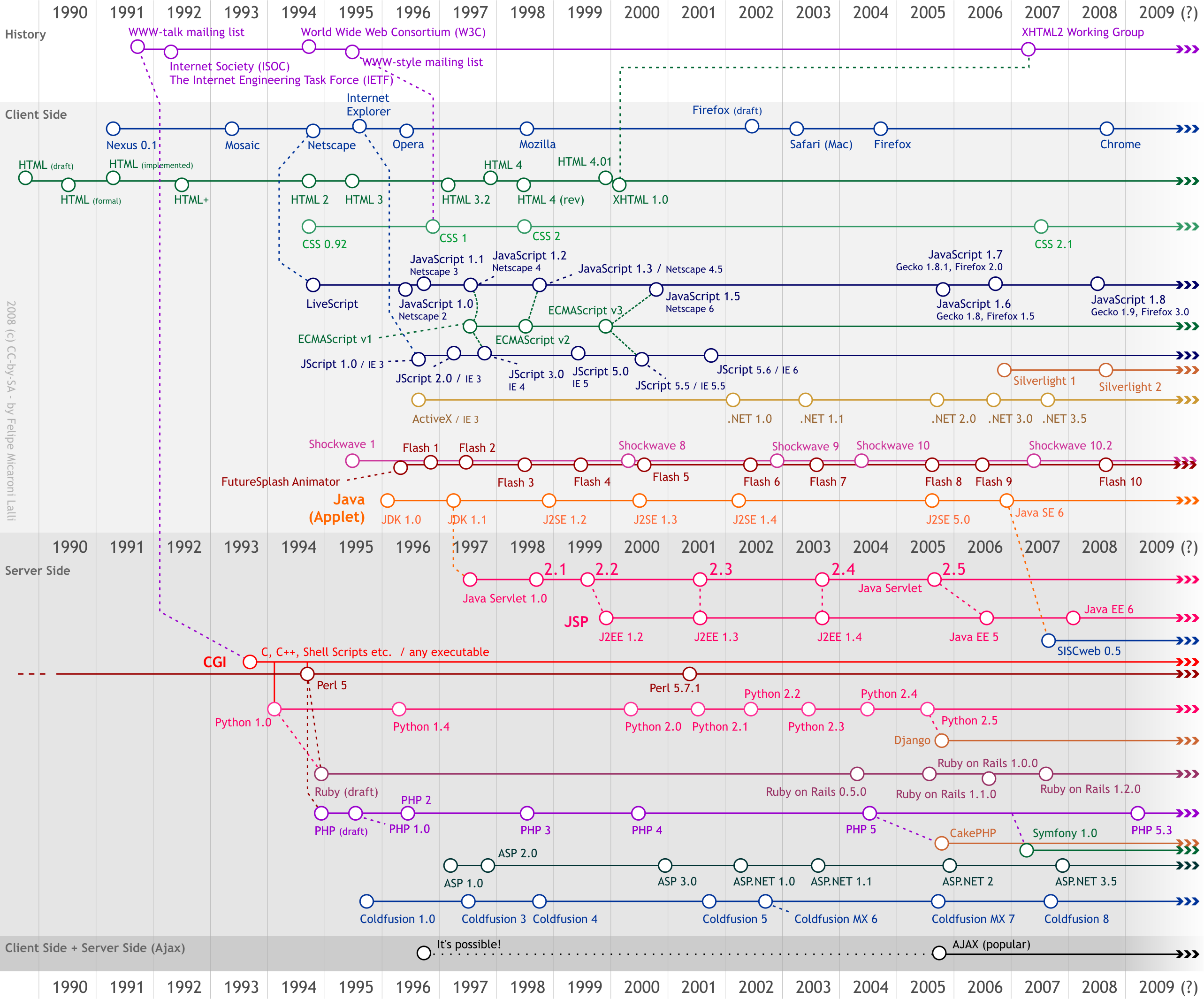
Rápida y breve historia del desarrollo en la Web


Un gráfico suele ayudar a entender un problema, particularmente las líneas de tiempo. Publicadas en Wikipedia, dos "timelines" sobre evolución de lenguajes y de browsers tienen la virtud de hacer visible el fulminante crecimiento de Internet como carril del desarrollo del software. Con trabajos precursores a finales de los ochenta, a partir de la década del 90 su crecimiento convirtió cualquier predicción sobre su evolución en hechos consumados en pocos años, retroalimentando una espiral de crecimiento que abre posibilidades apenas imaginadas quince años antes. Un impacto que promete cambiar profundamente las posibilidades de conocimiento del conjunto de la sociedad urbana.
Aquí se publica uno de ellos. El otro, se lo puede encontrar en Wikimedia.
Los artículos de Wikipedia que los sustentan son History of the web browser, y Web development.